
Click to Pay
This page will help you get started with Click to Pay.
Content Security Policy (CSP)Para que esta wallet funcione correctamente en tu sitio, debés incluir en tu Content Security Policy los dominios que devuelve el endpoint de Koin. Si no los agregás, el botón o el checkout pueden no cargar.
Changelog
| Fecha | Versión | Breaking changes | Cambios |
|---|---|---|---|
| 24 feb 2026 | 2.1.0 | NO | Ahora se puede forzar el lenguaje mediante el método initialize |
| 10 dic 2025 | 2.0.0 | SI | Click To Pay ahora sigue la misma API que las otras wallets |
V2.1.0
Integración
Agregar el script de wallets de Koin.
- Producción: https://payments.koin.com.br/checkout/sdk/v1/methods.js
- Sandbox: https://portal-dev.koin.com.br/checkout/sdk/v1/methods.js
API
- Luego de agregar el script de wallets de Koin a tu página tendrás disponible dentro de window un objeto llamado KoinPayments.
- Crear una instancia de la clase Wallet para el método de pago CLICK_TO_PAY de la siguiente manera:
const c2p = await window.KoinPayments.wallet(data);data vendrá desde Koin Payments y deberás pasarlo como parámetro sin hacerle ninguna modificación.
- El paso anterior es el único momento donde nuestro SDK puede arrojar una excepción, por eso recomendamos capturar el error en caso que haya alguno.
Una vez hecho esto, tendremos un objeto creado con los siguientes métodos:
-
initialize(afterInitializedCallback): El afterInitializedCallback se va a ejecutar solo cuando se haya podido inicializar el SDK de Cybersource con éxito. Caso contrario se puede recibir el error utilizando previamente onError.
-
mount(buttonCssSelector, containerCssSelector): Los errores relacionados a esta función también se devuelven en el onError. Esta función recibe dos parámetros:
-
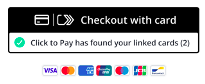
buttonCssSelector: Un selector CSS que apunte a un <div> dónde se va a colocar el botón de Cybersource.
-
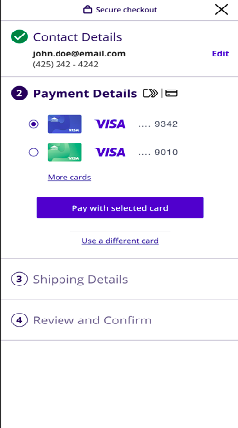
containerCssSelector: Un selector CSS que apunte a un <div> donde se va a insertar el checkout de Cybersource.
-
-
onError({code, origin, message}): Manejo de errores de Cybersource o Koin. Siempre siguen el mismo formato. Adherimos a la práctica ‘Never throw’ así que no habrá excepciones en ningún momento. Todos los errores saldrán por este método.
-
onSuccess(koin_network_token+card_info+wallet_code): Caso exitoso. Devuelve koin_network_token + info card + wallet_code en un mismo objeto:
{
  wallet_code: "CLICK_TO_PAY";
  koin_network_token: string;
  card: {
    bin: string;
    brand: {
      name: string;
      code: string;
    }
  }
}- onEvent(code, payload): Eventos para comunicar el estado del proceso cuando sea posible y mantener al tanto al consumidor de nuestro script. El payload es opcional dependiendo del evento que se dispare.
- destroy(): Elimina la instancia existente del SDK de Cybersource si hay una.
> Todos los errores durante el flujo CLICKTOPAY se devuelven mediante el onError.
> Los métodos onSuccess, onEvent y onError sólo se pueden usar una vez.
Eventos
| Code | Description | Payload |
|---|---|---|
| CARD_SELECTION_DONE | Occurs when the user completes Cybersource checkout steps. | |
| BUTTON_LOAD | Occurs when Cybersource click to pay button appears. | |
| CHECKOUT_OPEN | Occurs after the user clicks on the Click to Pay button. | |
| CHECKOUT_LOADED | Occurs when Cybersource checkout finished loading. | |
| CHECKOUT_CLOSE | Occurs when the user closes Cybersource checkout or when Cybersource closes their checkout internally. | |
| WALLET_DESTROYED | Occurs when destroy() was called and the instance was removed. |
Errores
Cyber: JavaScript Reference
| Code | Message | Origin |
|---|---|---|
| CAPTURE_CONTEXT_INVALID | Occurs when you pass an invalid JWT. | CYBER |
| CAPTURE_CONTEXT_EXPIRED | Occurs when the JWT you pass has expired. | CYBER |
| SDK_XHR_ERROR | Occurs when a network error is encountered while attempting to load the SDK. | CYBER |
| UNIFIED_PAYMENTS_ALREADY_SHOWN | Occurs when you attempt to show a Unified Payments instance multiple times. | CYBER |
| SHOW_LOAD_CONTAINER_SELECTOR | Occurs when a DOM element cannot be located using the supplied CSS Selector string. | CYBER |
| SHOW_LOAD_INVALID_CONTAINER | Occurs when an invalid container parameter is supplied. | CYBER |
| SHOW_LOAD_ERROR | Occurs when there is an issue loading the payment iframe. | CYBER |
| SHOW_TOKEN_TIMEOUT | Occurs when the createToken call is unable to proceed. | CYBER |
| SHOW_TOKEN_XHR_ERROR | Occurs when a network error is encountered while attempting to create a token. | CYBER |
| SHOW_PAYMENT_TIMEOUT | Occurs when an error is encountered during the handling of a payment option. | CYBER |
| UNKNOWN_ERROR | Occurs when an unknown error has occurred. | CYBER |
| UNIFIEDPAYMENTS_VALIDATION_PARAMS | Occurs when there's an issue with params supplied to UnifiedPayments constructor. | CYBER |
| UNIFIEDPAYMENT_PAYMENT_PARAMETERS | Occurs when no valid payment parameters exist while initializing the button. | CYBER |
| CREATE_TOKEN_TIMEOUT | Occurs when the createToken call is unable to proceed. | CYBER |
| CREATE_TOKEN_XHR_ERROR | Occurs when a network error is encountered while attempting to create a token. | CYBER |
| Code | Message | Origin |
|---|---|---|
| GNT_INTERNAL_SERVER_ERROR | Internal server error during get_network_token phase. | KOIN |
| GNT_MISSING_DYNAMIC_PAYMENT_KEY | Missing dynamic payment key during get_network_token | KOIN |
| GNT_DUPLICATED_DYNAMIC_PAYMENT_KEY | Dynamic payment key was already used previously | KOIN |
| GNT_MISSING_KOIN_NETWORK_TOKEN | Card not supported | KOIN |
| NOT_INITIALIZED | Tried to call mount() without calling initialize() previously | KOIN |
| INIT_MISSING_DYNAMIC_PAYMENT_KEY | Dynamic payment key is missing (was not found in the initialize object) | KOIN |
| INIT_MISSING_JS | Javascript url is missing (was not found in the initialize object) | KOIN |
| INIT_MISSING_JWT | JWT is missing (was not found in the initialize object) | KOIN |
Ejemplo
1 - Crear una instancia de la wallet
El objeto data vendrá desde Payments. Tendrás que pasarlo como primer parámetro sin hacerle ninguna modificación.
const c2p = await window.KoinPayments.wallet(data);2 - Agregar listeners
Sólo se puede usar una sola vez cada método, onSuccess, onError y onEvent.
Podés ver los eventos disponibles y los errores posibles en la documentación de Wallets SDK.
c2p.onSuccess((networkTokenPlusCardInfo) => {
  console.log("Network token + card info: ", networkTokenPlusCardInfo);
});

c2p.onError((error) => {
  console.error(
    "Error from callback: ",
    error.code,
    error.message,
    error.origin,
  );
});

c2p.onEvent((event) => {
  console.log("Event from callback: ", event);
  switch (event) {
    case "BUTTON_LOAD":
      // Ocurre cuando carga el botón de Cybersource
      break;
    case "CHECKOUT_OPEN":
      // Ocurre cuando se crea el iframe del checkout de Cybersource
      break;
    case "CHECKOUT_CLOSE":
      // Ocurre cuando el usuario cierra el checkout de Cybersource
      break;
    case "CARD_SELECTION_DONE":
      // Ocurre cuando el usuario termine el checkout de Cybersource
      break;
    case "CHECKOUT_LOADED":
      // Ocurre cuando el iframe con el checkout de Cybersource está completamente cargado
      break;
  }
});
3 - Iniciar flujo y montar el botón y checkout de Click To Pay
El método initialize se puede usar la cantidad de veces que se necesite.
Importante: el método mount se debe usar de la siguiente manera (y siempre dentro del callback del initialize):
const c2p = await window.KoinPayments.wallet(initialData);

async function onClick() {
  c2p.initialize(() => {
    console.log("Initialized");
    c2p.mount(
      // div donde se montará el botón de Click To Pay
      "#btn-container",
      // div donde se montará el checkout de Click To Pay
      "#checkout-container",
    );
  });
}
4 - Código completo
const c2p = await window.KoinPayments.wallet(initialData);

// A modo de prueba vamos devolver un jwt pero no van a tener que usarlo en ningun momento.
// Cuando avancemos el desarrollo aca vamos a devolver un network_token + datos no sensibles de la tarjeta
c2p.onSuccess((networkTokenPlusCardInfo) => {
  console.log("Network token + card info: ", networkTokenPlusCardInfo);
});

c2p.onError((error) => {
  console.error(
    "Error from callback: ",
    error.code,
    error.message,
    error.origin,
  );
});

c2p.onEvent((event) => {
  console.log("Event from callback: ", event);
  switch (event) {
    case "BUTTON_LOAD":
      // Ocurre cuando carga el botón de Cybersource
      break;
    case "CHECKOUT_OPEN":
      // Ocurre cuando se crea el iframe del checkout de Cybersource
      break;
    case "CHECKOUT_CLOSE":
      // Ocurre cuando el usuario cierra el checkout de Cybersource
      break;
    case "CARD_SELECTION_DONE":
      // Ocurre cuando el usuario termina el checkout de Cybersource
      break;
    case "CHECKOUT_LOADED":
      // Ocurre cuando el iframe con el checkout de Cybersource está completamente cargado
      break;
  }
});

async function onClick() {
  c2p.initialize(() => {
    console.log("Initialized");
    c2p.mount("#btn-container", "#checkout-container");
  });
}
V1 (Deprecada)
API
Estos métodos estarán disponibles en window.koinClickToPay
-
initialize(data, afterInitializedCallback): El objeto data va a ser lo que devuelve payments en la llamada al InitWallet. El afterInitializedCallback se va a ejecutar solo cuando se haya podido inicializar el sdk de cyber con éxito. Caso contrario se puede recibir el error utilizando onError.
-
mount(buttonCssSelector, containerCssSelector): Los errores relacionados a esta función también se devuelven en el onError. Esta función recibe dos parámetros:
-
buttonCssSelector: Un selector CSS que apunte a un <div> dónde se va a colocar el botón de Cybersource.
-
containerCssSelector: Un selector CSS que apunte a un <div> donde se va a insertar el checkout de Cybersource.
-
-
onError({code, origin, message}): Manejo de errores de cyber o koin. Siempre siguen el mismo formato.
-
onSuccess(koin_network_token+card_info): Caso exitoso. Devuelve koin_network_token + info card en un mismo objeto:
{
  koin_network_token: string;
  card: {
    bin: string;
    brand: {
      name: string;
      code: string;
    }
  }
}- onEvent(code, payload): Eventos para comunicar el estado del proceso cuando sea posible y mantener al tanto al consumidor de nuestro script. El payload es opcional dependiendo del evento que se dispare.
- destroy(): Elimina la instancia existente del SDK de Cybersource si hay una.
Eventos
| Code | Description | Payload |
|---|---|---|
| CARD_SELECTION_DONE | Occurs when the user completes Cybersource checkout steps. | |
| BUTTON_LOAD | Occurs when Cybersource click to pay button appears. | |
| CHECKOUT_OPEN | Occurs after the user clicks on the Click to Pay button. | |
| CHECKOUT_LOADED | Occurs when Cybersource checkout finished loading. | |
| CHECKOUT_CLOSE | Occurs when the user closes Cybersource checkout or when Cybersource closes their checkout internally. |
Errores
Cyber: JavaScript Reference
| Code | Message | Origin |
|---|---|---|
| CAPTURE_CONTEXT_INVALID | Occurs when you pass an invalid JWT. | CYBER |
| CAPTURE_CONTEXT_EXPIRED | Occurs when the JWT you pass has expired. | CYBER |
| SDK_XHR_ERROR | Occurs when a network error is encountered while attempting to load the SDK. | CYBER |
| UNIFIED_PAYMENTS_ALREADY_SHOWN | Occurs when you attempt to show a Unified Payments instance multiple times. | CYBER |
| SHOW_LOAD_CONTAINER_SELECTOR | Occurs when a DOM element cannot be located using the supplied CSS Selector string. | CYBER |
| SHOW_LOAD_INVALID_CONTAINER | Occurs when an invalid container parameter is supplied. | CYBER |
| SHOW_LOAD_ERROR | Occurs when there is an issue loading the payment iframe. | CYBER |
| SHOW_TOKEN_TIMEOUT | Occurs when the createToken call is unable to proceed. | CYBER |
| SHOW_TOKEN_XHR_ERROR | Occurs when a network error is encountered while attempting to create a token. | CYBER |
| SHOW_PAYMENT_TIMEOUT | Occurs when an error is encountered during the handling of a payment option. | CYBER |
| UNKNOWN_ERROR | Occurs when an unknown error has occurred. | CYBER |
| UNIFIEDPAYMENTS_VALIDATION_PARAMS | Occurs when there's an issue with params supplied to UnifiedPayments constructor. | CYBER |
| UNIFIEDPAYMENT_PAYMENT_PARAMETERS | Occurs when no valid payment parameters exist while initializing button. | CYBER |
| CREATE_TOKEN_TIMEOUT | Occurs when the createToken call was unable to proceed. | CYBER |
| CREATE_TOKEN_XHR_ERROR | Occurs when a network error is encountered while attempting to create a token. | CYBER |
| Code | Message | Origin |
|---|---|---|
| GNT_INTERNAL_SERVER_ERROR | Internal server error during get_network_token phase. | KOIN |
| GNT_MISSING_DYNAMIC_PAYMENT_KEY | Missing dynamic payment key during get_network_token | KOIN |
| GNT_DUPLICATED_DYNAMIC_PAYMENT_KEY | Dynamic payment key was already used previously | KOIN |
| GNT_MISSING_KOIN_NETWORK_TOKEN | Card not supported | KOIN |
| NOT_INITIALIZED | Tried to call mount() without calling initialize() previously | KOIN |
| INIT_MISSING_DYNAMIC_PAYMENT_KEY | Dynamic payment key is missing (was not found in the initialize object) | KOIN |
| INIT_MISSING_JS | Javascript url is missing (was not found in the initialize object) | KOIN |
| INIT_MISSING_JWT | JWT is missing (was not found in the initialize object) | KOIN |
Ejemplo de implementación
Codesandbox: https://codesandbox.io/p/sandbox/z2l4h2
Demo: https://z2l4h2.csb.app
Consideraciones
- Los servicios para generar los datos iniciales necesarios aún no están desarrollados por lo que es necesario suministrar a mano un jwt cuyo contenido estará en un archivo txt en el mismo Codesandbox.
- Para probar es importante que lo hagan desde https://z2l4h2.csb.app para evitar errores de Cyber.
- El onSuccess devolverá un jwt de momento hasta tener en ambientes de prueba los servicios necesarios para devolverles el koin_network_token + datos no sensibles de la tarjeta.
- Si necesitan probar local tienen que levantar un servidor https y en el puerto 8080
Updated 5 months ago